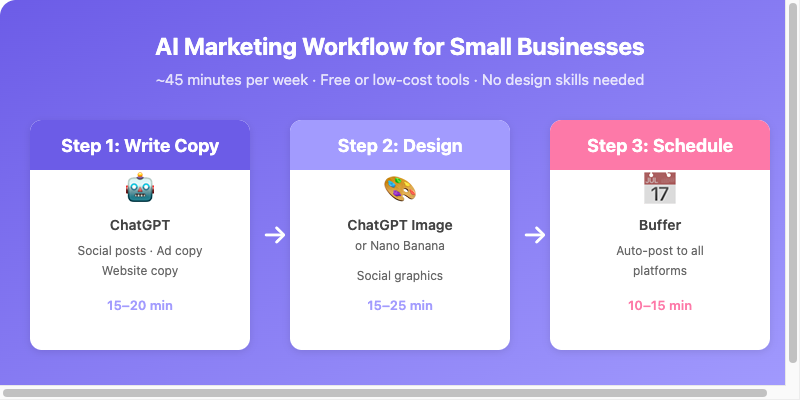
The three-step AI marketing workflow: from copy to design to scheduled publishing
The 30-second version: For a one-person business, the biggest barrier to marketing isn’t budget — it’s time. This workflow breaks it into three steps: write your copy with ChatGPT, generate your social media graphics with ChatGPT Image or Nano Banana, and schedule your posts with Buffer. You don’t need any design background, just a good prompt.
The Real Problem with Marketing a Small Business
Most small business owners and freelancers know they should be marketing. The trouble is that day-to-day operations already drain every ounce of energy, so there’s no time left for writing posts, designing images, or posting on a schedule. The result is the same everywhere: social accounts go quiet for weeks, and brand awareness depends on word of mouth and luck.
AI tools won’t replace your marketing strategy. What they will do is compress the execution time from several hours down to a few dozen minutes.
Who This Article Is For
- One-person companies, small shops, and freelancers who want to handle their own marketing but have limited time.
- Anyone with existing social accounts that they update inconsistently, and who wants a sustainable routine.
- Budget-conscious readers who want to start with free or low-cost tools before committing to paid plans.
Overview of the AI Workflow
Three stages, each mapped to one or two core tools:
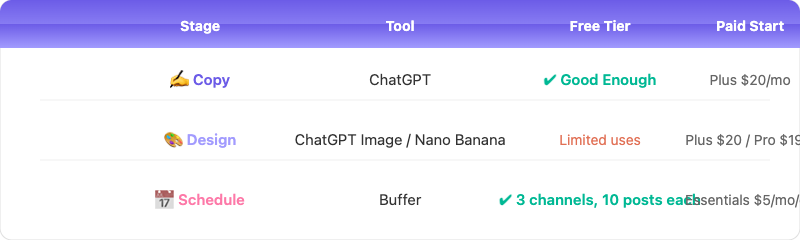
Each stage of the workflow maps to a tool with a usable free tier
Step 1: Write Marketing Copy with ChatGPT
Copy is the part of marketing where people get stuck most often. ChatGPT’s greatest value isn’t producing “perfect” copy — it’s breaking through the blank-page barrier so you have a first draft to refine.
Three Types of Copy You’ll Write Constantly
1. Social Media Posts — These are the most frequent updates and the fastest way to run out of ideas. ChatGPT can spin up multiple versions quickly based on your product, target customer, and the goal of the post.
The article gives a ready-to-use prompt that asks for three Instagram post captions, specifying the tone, brand, product, target customer, and goal, with a 150-character limit, a call to action at the end, and a request to avoid an aggressive sales tone.
2. Ad Copy — Facebook and Instagram ads have about three seconds to grab attention. You can generate different angles: a problem-first version, a results-driven version, and a social-proof version. The provided prompt template asks for three variants (pain-point opener, product-result opener, social-proof opener), each no longer than 80 characters.
3. Website Homepage or Product Page Copy — You only have to write this once, and it pays off for a long time. ChatGPT can generate a complete, well-structured framework from the information you feed it, including a headline, subheadline, feature descriptions, and a call to action.
A Note on Using It Well
ChatGPT’s output tends to sound too stiff and formal. After generation you must do two things: “first, rewrite it in the tone you’d use when talking to your customers in person; second, add details that are unique to your brand.”
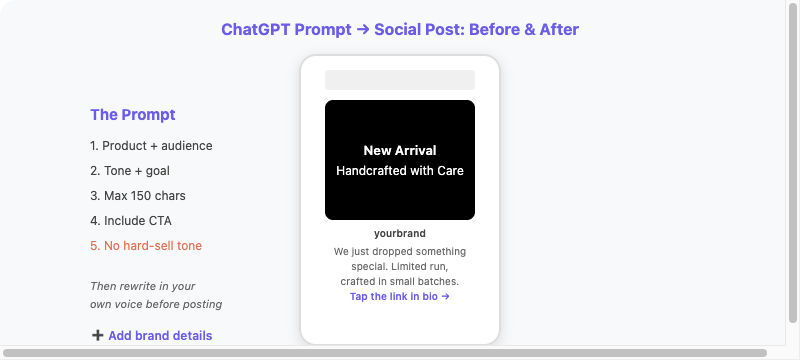
A good prompt produces a usable draft — then you make it sound like you
Step 2: Generate Social Media Graphics with ChatGPT Image or Nano Banana
Click-through on visual content decides whether your copy ever gets seen. AI can produce a finished graphic — text included — in one step, saving you the entire layout process.
The Difference Between the Two Tools
| Tool | What It’s Best At |
|---|---|
| ChatGPT Image | Precise text rendering, supports conversational edits (e.g. “make the title bigger”) |
| Gemini Nano Banana | Fast generation, strong realism |
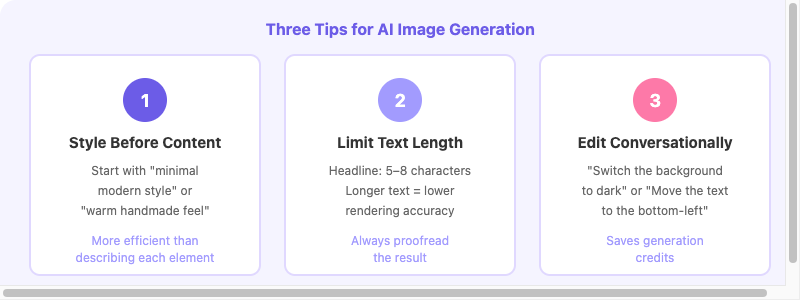
Style first, text short, edit like a conversation — three principles for reliable AI-generated graphics
Three Social Media Graphic Prompt Templates
1. Instagram Product Promo Post (1:1) — Specify the brand style, primary color, main visual, a headline of 5–8 characters (best length), and supporting text, and ask for a clean, high-quality look overall.
2. Instagram/Facebook Stories (9:16) — Great for promotions, new product launches, or brand introductions. Text should be large and legible for mobile viewing.
3. Facebook Ad Banner (16:9) — Specify the product, target customer, core message, visual elements, text content, and call to action.
Two Real-World Limitations
- Text accuracy can still go wrong, especially with longer sentences or mixed alphanumeric text. Always proofread the result carefully.
- Brand consistency is harder to control than with template tools. The fix is to add “the primary color must be [color code or name]” to every prompt.
Step 3: Schedule Social Media Content with Buffer
Buffer lets you prepare a week or even two weeks of content in one sitting, set post times, and have everything sent out automatically.
Supported Platforms
Instagram, Facebook, X (Twitter), LinkedIn, TikTok, Pinterest, YouTube Shorts, and Threads.
Buffer Pricing
| Plan | Monthly Cost | Channels | Scheduling Limit |
|---|---|---|---|
| Free | $0 | 3 channels | 10 posts per channel |
| Essentials | $5/month per channel | As many as you need | Unlimited |
| Team | $10/month per channel | As many as you need | Unlimited + team collaboration |
For a small business managing Instagram, Facebook, and LinkedIn, the free plan’s three-channel quota is plenty. The 10-post limit only becomes a problem if you’re posting more than two or three times per channel each week.
How to Use It Well
Set aside a single hour each week, prepare all the posts for the next seven days, and load them into Buffer in one go. If you publish one post per day, the free plan can schedule about ten days ahead.
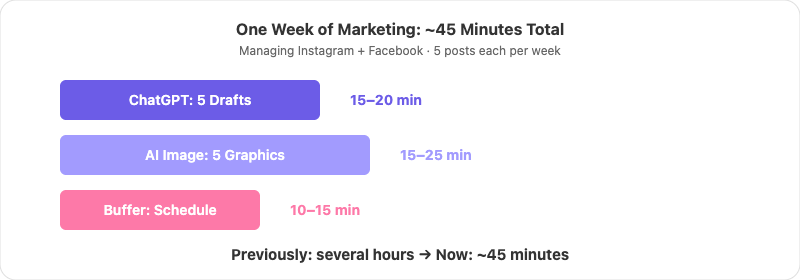
The full weekly workflow: from copy drafts to live-scheduled posts in under an hour
Pros and Cons
Pros
- No design tools to learn for the visual stage.
- Conversational editing means you don’t have to rewrite the whole prompt.
- Buffer automation removes the daily manual posting.
- The whole weekly routine takes about 45 minutes to an hour.
Cons and Limitations
- Text in AI-generated graphics can be wrong, so human proofreading is still required.
- Brand consistency is harder to control than with template tools; you need to specify colors in each prompt.
- ChatGPT copy must be edited before use — using it as-is reads obviously “AI-generated.”
- Buffer’s free plan caps each channel at 10 pending posts.
- This workflow doesn’t cover engagement (replying to comments and DMs), which still needs a human.