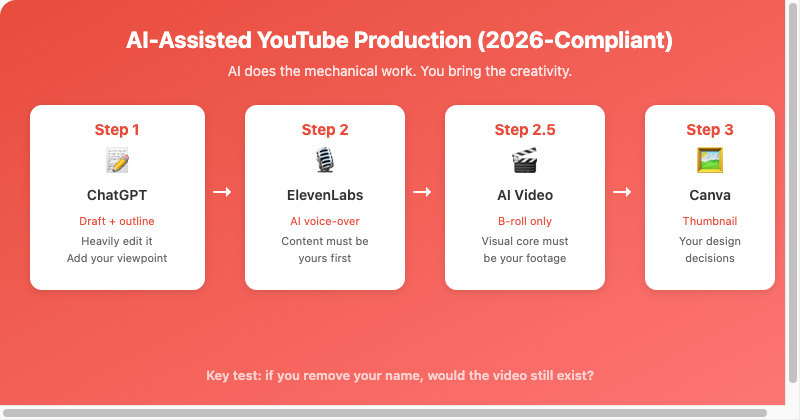
Four-step workflow: AI handles drafts, voice, and B-roll — you own the creative core
The 30-second version: AI tools can massively speed up YouTube video production. But after YouTube updated its policy, channels posting pure AI output now risk losing monetization or even permanent deletion. This article walks through a fully compliant workflow using ChatGPT (scripts), ElevenLabs (voice-over), Canva/ChatGPT Image/Nano Banana (thumbnails), and AI video generators (as supplementary B-roll) — and explains where each tool sits under YouTube”s 2026 “inauthentic content” policy.
YouTube”s 2026 Policy: What Is Allowed and What Gets You Deleted
In July 2025, YouTube renamed its “repetitive content” policy to the “inauthentic content” policy, dramatically expanding enforcement. In January 2026, YouTube permanently deleted 16 channels in a single sweep — channels that combined held 4.7 billion views and 35 million subscribers.
What did those deleted channels have in common? They relied on AI for the entire pipeline with no human creative input — AI scripts, AI narration, AI images, identical video structure every time, and mass uploads.
YouTube”s position isn”t that AI is banned. It”s that AI must not replace the creator. You can use AI to accelerate the work, but the creator”s perspective, analysis, and voice have to be clearly visible in the final video.
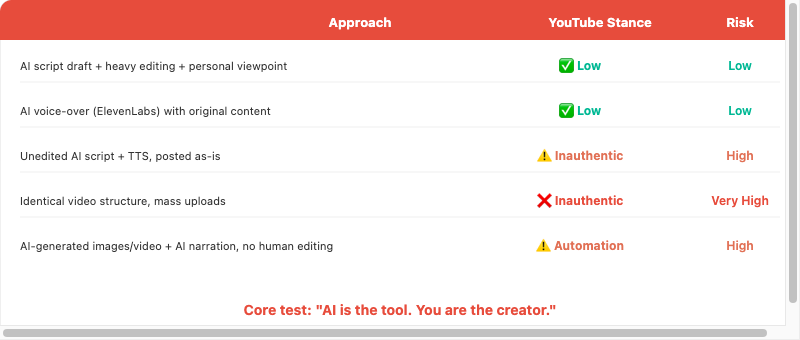
The deciding factor is not whether you used AI, but whether you contributed as a creator
Who This Article Is For
- YouTubers who want AI to boost their efficiency while staying monetization-eligible.
- People building faceless channels who aren”t sure how much “human element” counts as compliant.
- Channel owners who want to audit whether their current workflow carries monetization risk.
- Beginners who want to build the right AI-assisted habits from day one.
The Full Workflow: AI-Assisted, Not AI-Replaced
The core principle: let AI do the mechanical work, and you make the creative decisions.
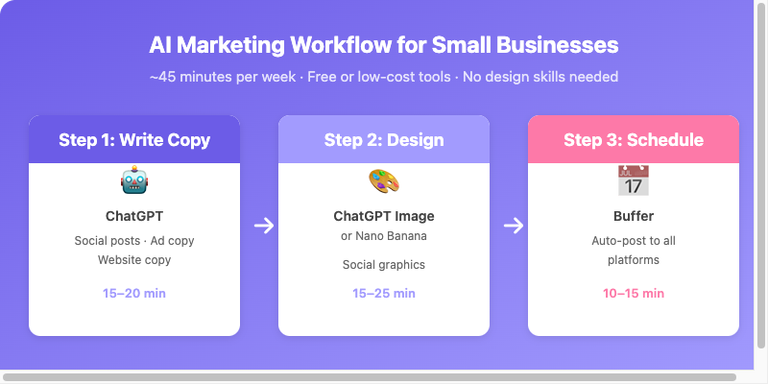
| Step | Tool | AI Handles | You Must Handle | Paid Start |
|---|---|---|---|---|
| 1 | ChatGPT | Script draft, structure | Viewpoint, examples, tone, personal experience | Free is enough |
| 2 | ElevenLabs | Voice generation | Script content must be yours first | $5/mo |
| 2.5 | AI Video Generator | Supplementary B-roll | Only a minor supplement | $15/mo |
| 3 | Canva / ChatGPT Image / Nano Banana | Thumbnail layout / background | Visual choices, brand consistency | Free / $20/mo |
Step 1: Write the Script with ChatGPT — But Heavily Edit It
ChatGPT can help you draft a script. But under the 2026 enforcement standards, using AI output without editing it is “one of the fastest ways to get monetization removed.” YouTube”s systems and human reviewers can recognize typical AI script patterns: similar openings, identical paragraph structures, and a uniform, flat tone.
How to Use ChatGPT Correctly
- Have ChatGPT generate an outline first, not a full script. Confirm the direction matches your viewpoint.
- Generate section by section, adding your own thinking — examples you have personally tested, your judgments, or claims viewers won”t hear elsewhere.
- Re-speak the final script in your own voice and tone.
Prompt Template
Ask ChatGPT for an outline only: the opening hook, core arguments across three sections, and a CTA direction. Ask for a conversational tone and tell it to avoid canned phrases like “in today”s video” or “let”s explore together.” Fill in the details yourself.
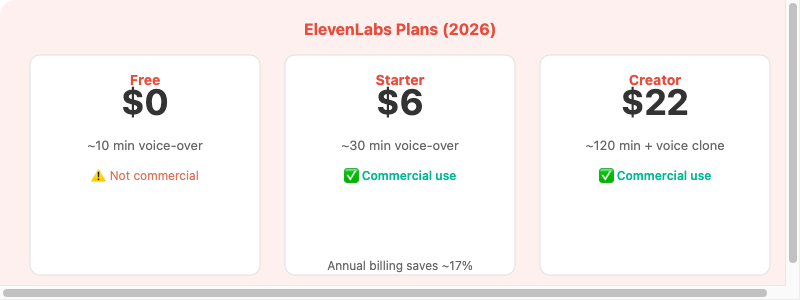
ElevenLabs pricing tiers — the free plan lacks a commercial license
Step 2: AI Voice-Over with ElevenLabs
YouTube”s policy does not ban AI voice-over tools. The deciding factor is whether the content as a whole is “original and authentic” or “mass-produced and repetitive.” As long as the script has real human creative input, an AI voice-over is just a production tool — no different in principle from a microphone.
YouTube”s Disclosure Requirements
YouTube requires disclosure of “altered content,” but mainly for AI voices that realistically mimic real people (celebrities, politicians, etc.), or AI imagery that could make viewers believe a real event happened. For a typical tutorial or informational channel, AI voice-over is not in the mandatory disclosure range. If unsure, add a note in the description: “This video was produced with an AI voice-over.”
Step 2.5 (Optional): AI-Generated Video Footage
Tools like Seedance 2.0, Kling, VEO 3.1, and Hailuo support text-to-video and image-to-video generation. AI clips work well as supplementary B-roll — for example, inserting dynamic visuals while explaining a concept in a tutorial.
Compliant: screen recordings or real footage as the foundation + short AI clips as a minor supplement + your own script and voice-over.
High risk: the visual core of every video is entirely AI-generated + AI voice-over + AI script, with a human only doing the upload — this matches the deleted channels” pattern exactly.
Step 3: Make YouTube Thumbnails
Thumbnail design is the step where human judgment matters most. You need to understand what audiences react to, and that is a decision AI cannot make for you.
| Tool | Use | Free Tier |
|---|---|---|
| Canva | Template design + AI image generation | Good enough (bg removal needs Pro $18/mo) |
| ChatGPT Image | AI thumbnail background | ~2–3 images/day |
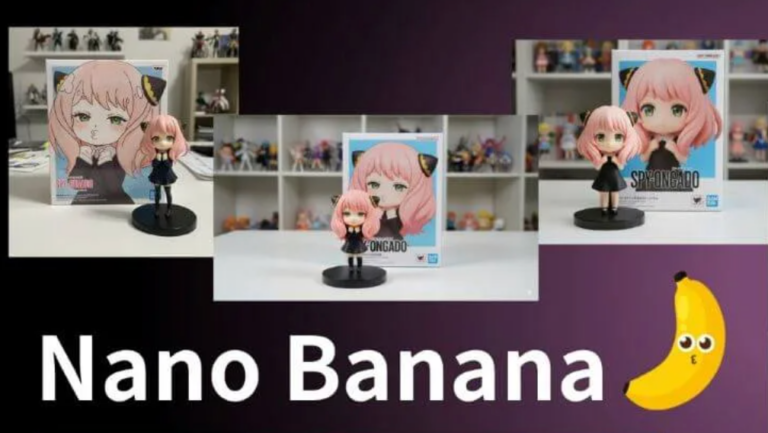
| Nano Banana | AI thumbnail background | ~3 images/day (watermark) |
Compress text to 5 characters or fewer, use high-contrast colors, and keep the main visual clear. A fixed template with image/text swaps is the most efficient approach.
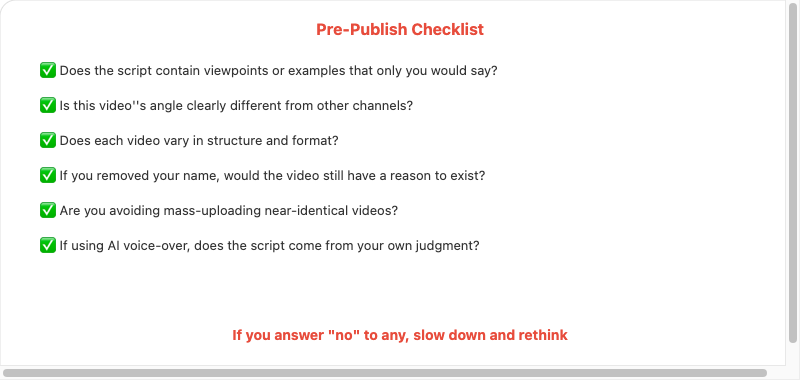
Run through this checklist before every upload
Pros and Cons
Pros
- AI handles mechanical work while you focus on creative decisions.
- Saves 50–70% of production time versus fully manual work.
- ElevenLabs + original script is compliant with the 2026 policy.
- AI video generators work as a supplementary B-roll source.
- Every tool has a free entry tier.
Cons and Limitations
- AI scripts must be heavily edited; you cannot copy-paste them.
- ElevenLabs free plan is not licensed for commercial use.
- AI video can only be supplementary; a fully AI-generated visual core risks monetization.
- ChatGPT Image and Nano Banana free tiers have daily limits.
- Every video still needs real opinions and judgment from you.
FAQ
1. Can a channel using AI voice-over be approved for YPP?
Yes. The standard is whether the content is “original and authentic,” not the voice-over method. AI voice-over is a production tool, no different from a microphone.
2. Can AI-generated video be monetized?
Yes, with an important limitation. The visual core cannot rely entirely on AI. Lead with screen recordings or real footage, using AI clips as a minor B-roll supplement.
3. Can images from ChatGPT Image or Nano Banana be used in thumbnails?
Yes, and YouTube does not require disclosure of the thumbnail tool. But confirm your plan includes commercial licensing.
4. Are faceless channels still viable in 2026?
Yes. YouTube has confirmed faceless channels remain legal, provided the content is original and not mass-copied. Your viewpoint and judgment must exist in the video — it does not have to be your face.
5. How do I know if my channel is at risk?
High-risk signals: every video has an identical structure, script reads like ChatGPT output, mass uploads in a short period, no personal viewpoint, and a visual core built entirely from AI. If two or more apply, slow down and reassess.