Updated 19 November 2026: Prices and free tiers in this article were checked on 19 November 2026. They change often, so confirm them on the official pricing page before you buy. Neither tool was hands-on tested for this article — the numbers come from the vendors’ own pages and from pricing guides that checked them in November 2026. Note the date: Veo 3.1 Fast and Veo 3.1 Quality retire from Google Flow on 5 December 2026 — after that, Flow’s video models are Veo 3.1 Lite and Omni Flash 1.2.
The short answer (30 seconds)
If you make Shorts, the question is not which model looks better in a demo. It is how many clips you need to fill one Short, and what each retake costs you.
- Kling 4.0 makes 3 to 30 seconds in one generation, with native stereo audio. One clip can be a whole Short. That makes it the simpler workflow for talking-head explainers, product demos and anything with dialogue that has to stay in sync.
- Veo 3.1 makes 4, 6 or 8 seconds per clip. A 30-second Short needs four clips stitched together. It wins on cinematic realism and on its free tier: every Google account gets 50 Flow credits a day, enough for five 8-second Veo 3.1 Lite clips a day at no cost.
- Cost per 30-second Short, roughly: Kling 4.0 about $4.80 on its Standard plan at 1080p (see the maths below), or $7.05 via its pay-per-second API. Veo 3.1 Lite is free inside the daily allowance, about $0.80 on a paid plan; Veo 3.1 Fast about $1.60–$2.00; Veo 3.1 Quality about $8.00. Quality is the expensive one — never use it for a throwaway test.
- If you only remember one thing: use Kling 4.0 when the Short is one continuous take, and Veo 3.1 Lite when you want a free, beautiful 8-second shot to open or close it. Many creators will end up using both.
What a YouTube Short actually needs
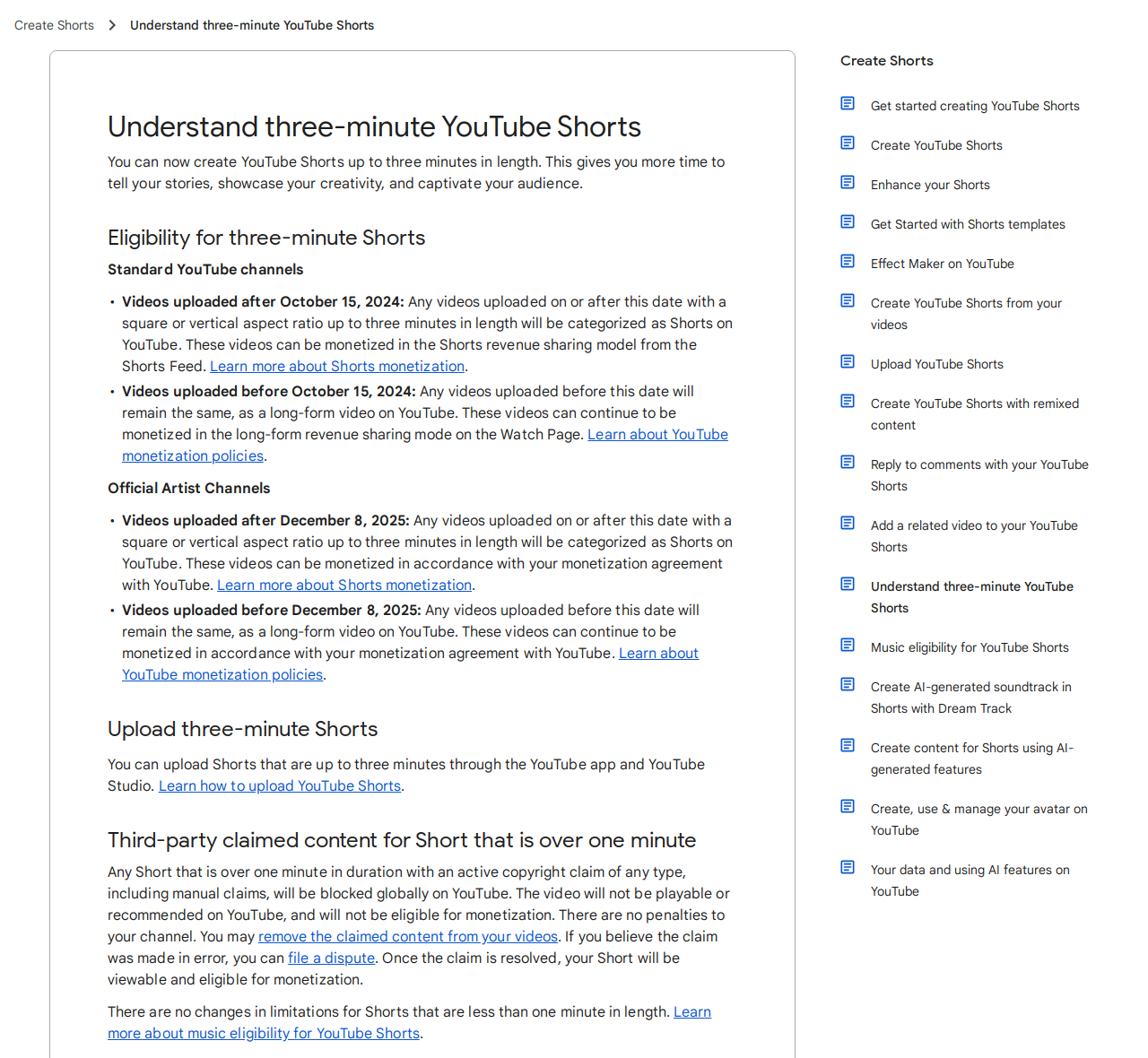
Before comparing the tools, here is the format they have to fit. A Short is any square or vertical video up to 3 minutes long, uploaded on or after 15 October 2024. The recommended export is 9:16 vertical at 1080 x 1920 pixels, and YouTube says the maximum upload resolution for Shorts is 1080p — exporting in 4K does not buy you a sharper Short.
Two rules catch creators out:
- A 16:9 horizontal video is not a Short, however short it is. It plays as a regular video.
- A Short over 1 minute with an active Content ID claim is blocked worldwide. Keep each Short under a minute if it uses claimed music, or use original / properly licensed audio. Native audio generated with the clip avoids this problem entirely — one more reason the audio in these tools matters.
That is why clip length matters so much. A 30-second Short is four Veo clips and their seams, or one Kling clip. A 60-second Short is eight Veo clips, or two Kling clips. Every seam is a place where a character’s face, a shirt or a background can change.
For the full comparison of the four tools these two came from — including Seedance 2.5 and the discontinued Sora 2 — see our AI Video Generation Tools Compared 2026.
Kling 4.0 vs Veo 3.1 at a glance
| Kling 4.0 | Veo 3.1 | |
|---|---|---|
| Maker | Kuaishou | Google DeepMind, inside Google Flow |
| Max clip in one generation | 3–30 seconds | 4, 6 or 8 seconds |
| Resolution | 720p, 1080p, 4K | 720p, 1080p, 4K (8-second clips; 4K needs a paid route) |
| Native audio | Yes — stereo, dialogue and lip sync in the same pass | Yes — dialogue, sound effects and ambience |
| Aspect ratio | 9:16 supported, plus 21:9 ultra-wide | 9:16 supported |
| Character / camera control | Up to 10 keyframes, up to 15 Omni references (images, video, voice) | Start and end frames, Ingredients / reference images (8-second clips only); Extend retired 5 Nov 2026 |
| Free route | Free Basic plan: monthly free credits at login, 720p, watermarked, personal use only | 50 Flow credits a day for any Google account; 5 Veo 3.1 Lite clips a day |
| Paid entry | Standard: $6.99 first month, then $8.80/month (list $10), 660 credits/month | Google AI Plus: $4.99/month, 200 Flow credits/month (+ 50/day free) |
| Best for | One continuous take, dialogue, longer stories | Cinematic single shots, free daily testing, realistic faces |
Sources for the table: Kling 4.0 launched to all users 15 October 2026 (Kling 3.0 topped out at 15 seconds); Veo 3.1 clip lengths and Flow credit costs from Google’s Flow help pages and pricing guides checked 31 October – 4 November 2026; Shorts specs from YouTube Help.
Kling 4.0: one clip can be the whole Short
Kling 4.0’s headline change over Kling 3.0 is length: 3 to 30 seconds in one pass, double the old 15-second ceiling, with stereo sound generated with the video. The default is 10 seconds; you set the length in 1-second steps.
For Shorts, that changes the workflow in three practical ways:
- Dialogue stays in sync. A 20-second explainer — hook, one point, call to action — can be a single generation, so lip sync does not have to survive a cut. Kling’s Omni Reference system (up to 15 assets: images, video clips and voice references) and up to 10 keyframes let you pin a character and a camera move across the whole scene.
- Fewer seams, fewer retakes. A bad take costs you one generation, not four. But every take is still billed, so three attempts at a 30-second clip cost three times as much — write the prompt and the shot list before you generate, not after the first failure.
- It is the cheaper way to make a long Short — if you pay monthly. On the Standard plan ($8.80/month renewal, 660 credits), a 10-second 1080p clip with sound costs about $1.60, or about $0.16 a second. A 30-second Short in one clip is therefore about $4.80. Via the pay-per-second API (fal), Kling 4.0 is $0.157 a second at 720p and $0.235 at 1080p, so a 30-second 1080p clip is $7.05. Kling 4.0 Flash, the cheaper faster variant, is $0.094 a second at 720p, but it is limited to 720p and 3–20 second clips.
The free plan is a trial, not a production plan: monthly free credits claimed at login, output at 720p only, watermarked, and licensed for personal use only — no commercial use and no watermark removal. Paid plans remove the watermark and add commercial use. That matters for Shorts: a watermarked clip posted to a monetised channel is a wasted upload.
Use Kling 4.0 when: the Short is one person talking, one product demo, or one scene that has to hold together for 15–30 seconds.
Veo 3.1: the best free test, and the most cinematic 8 seconds
Veo 3.1 lives inside Google Flow, Google’s video app. There is no separate Veo price — Flow comes with the Google AI plans: Plus $4.99/month (200 Flow credits), Pro $19.99 (1,000 credits), Ultra $99.99 (10,000) or $199.99 (25,000). Everyone, with or without a subscription, also gets 50 Flow credits a day, which do not roll over.
What one clip costs, in Flow credits:
| Veo 3.1 model, 8-second clip | Credits | What the free 50/day buys |
|---|---|---|
| Lite | 10 (5 on Ultra) | 5 clips a day |
| Fast | 20 (10 on Ultra) | 2 clips a day |
| Quality | 100 | None — a Quality clip never fits in the free allowance |
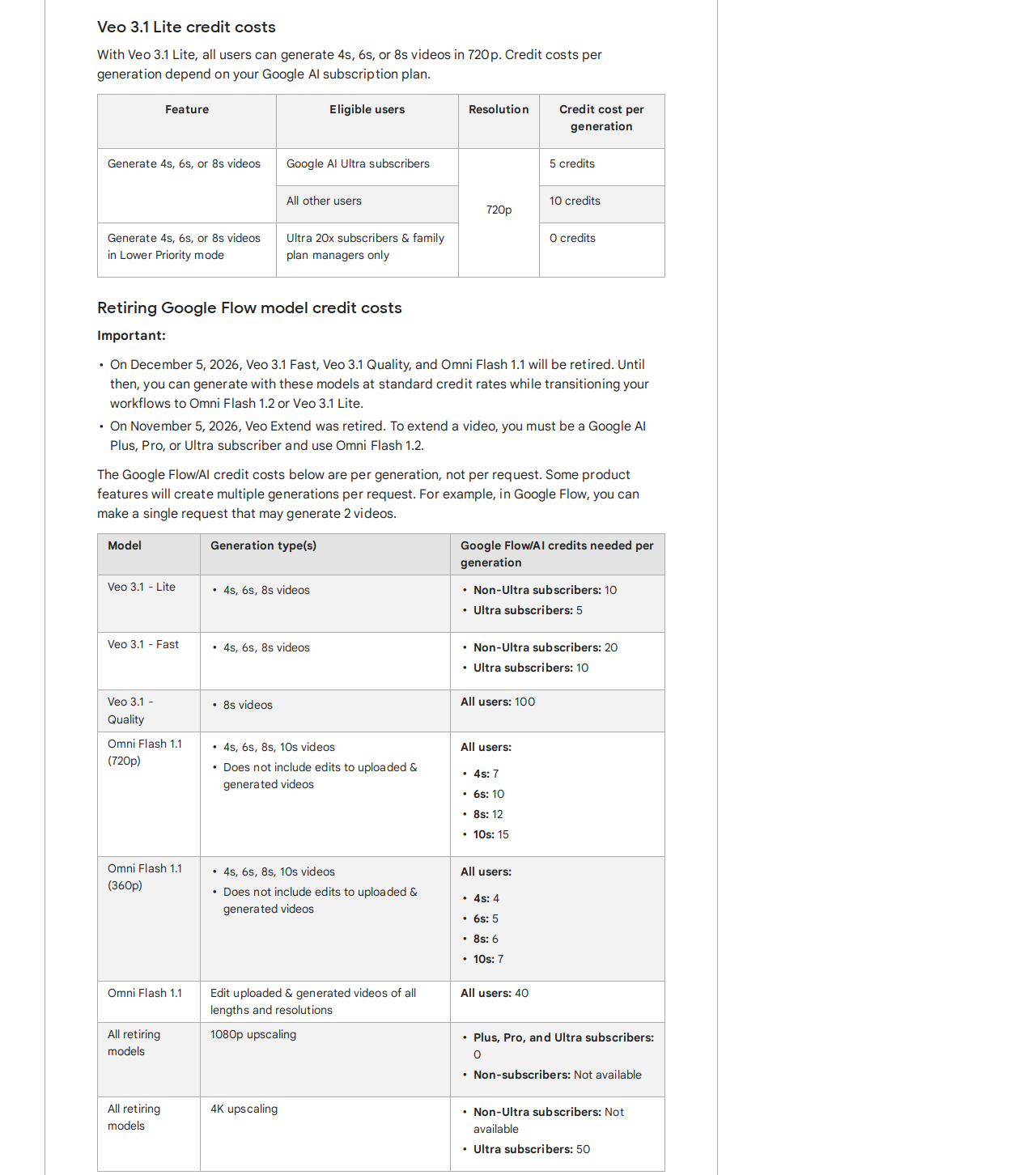
In money terms on the Pro plan ($19.99 for 1,000 credits, about $0.02 a credit): Lite about $0.20 a clip, Fast about $0.40, Quality about $2.00. On Plus ($4.99 for 200 credits): Lite about $0.25, Fast about $0.50, Quality about $2.50.
For a 30-second Short you need four 8-second clips, so:
| 30-second Short (4 x 8s, trimmed to 30s) | Free daily allowance | Plus ($4.99/mo) | Pro ($19.99/mo) |
|---|---|---|---|
| All Veo 3.1 Lite | Free — 40 of your 50 daily credits | ~$1.00 | ~$0.80 |
| All Veo 3.1 Fast | Not possible free (80 credits > 50) | ~$2.00 | ~$1.60 |
| All Veo 3.1 Quality | Not possible free (400 credits) | ~$10.00 | ~$8.00 |
Two limits to plan around. First, free accounts may not be able to generate video at peak hours, roughly 2–5 PM UTC — generate in the morning if you are on the free tier. Second, Veo Extend was retired on 5 November 2026, so you can no longer extend an 8-second clip inside Flow — plan each shot as a self-contained 4, 6 or 8 seconds. And a date to diary: Veo 3.1 Fast and Veo 3.1 Quality retire on 5 December 2026 — after that date, use Veo 3.1 Lite or Omni Flash 1.2 instead.
What Veo 3.1 is genuinely best at is the single beautiful shot: realistic faces, cinematic light, dialogue and ambience in one pass. If your Short is a montage — four different shots, a hook, a product close-up, a reaction, a payoff — Veo’s 8-second limit stops being a problem, because you were going to cut anyway.
Use Veo 3.1 when: you want the most cinematic 8 seconds you can get, you are testing ideas for free, or your Short is a montage of short shots rather than one long take.
Cost per Short: the honest maths
The table below is for a 30-second Short, one finished version, no retakes. Retakes are the real cost — budget for two or three attempts per clip when you are learning a tool, and multiply accordingly.
| Workflow | Clips needed | Cost per finished 30s Short |
|---|---|---|
| Kling 4.0, Standard plan, 1080p | 1 x 30s | ~$4.80 |
| Kling 4.0, API, 1080p | 1 x 30s | $7.05 |
| Kling 4.0 Flash, 720p (max 20s — needs 2 clips) | 2 clips | ~$3.76 via API ($0.094/s) |
| Veo 3.1 Lite, free daily credits | 4 x 8s | $0 (40 of 50 free credits) |
| Veo 3.1 Lite, Pro plan | 4 x 8s | ~$0.80 |
| Veo 3.1 Fast, Pro plan | 4 x 8s | ~$1.60 |
| Veo 3.1 Quality, Pro plan | 4 x 8s | ~$8.00 |
| Hybrid: Veo Lite hook + Kling body (see below) | 1 x 8s + 1 x 22s | ~$0.20 + ~$3.52 = ~$3.72 on paid plans |
The cheapest Short is a Veo Lite Short made inside the free daily allowance. The cheapest long-take Short is Kling 4.0 on a monthly plan. The most expensive mistake is testing in Veo Quality: at $2 a clip on Pro, four test takes of one shot cost more than a whole Lite Short.
A workflow that works: hook, body, payoff
Here is a workflow that uses each tool for what it is good at, for a 30-second Short in 9:16 at 1080 x 1920:
- Hook (0–8 seconds): Veo 3.1 Lite, free. One cinematic shot, one line of dialogue, the promise of the video. Generate it inside the 50 free daily credits. If it fails, it cost you nothing but 10 credits.
- Body (8–30 seconds): Kling 4.0, one 22-second clip. The explanation, the demo, the dialogue that has to stay in sync. One generation, one character, keyframes for the camera move.
- Edit on your phone. Trim the Veo clip to 8 seconds and the Kling clip to 22, cut on movement, add captions — most Shorts viewers watch muted, so captions are not optional. Keep the total at 30 seconds or under, and keep it vertical the whole way.
- Check the audio before you upload. If you used claimed music and the Short runs over a minute, YouTube blocks it worldwide. Native audio from the generation avoids that. Read our guide on making YouTube videos with AI without breaking the 2026 policy before you publish AI video at scale.
- Publish, then reuse. The same 30 seconds can be cut to a 15-second TikTok or Reel. For the wider workflow — copy, visuals and scheduling in one pass — see our small-business AI marketing workflow.
Which one should you pick?
- Pick Kling 4.0 if your Shorts are mostly one person talking, one product, or one scene that runs longer than 8 seconds — and you are willing to pay about $9 a month for a plan that covers it.
- Pick Veo 3.1 if you make montage-style Shorts, you care most about cinematic realism, or you want to test every day for free before spending anything.
- Pick both if you make Shorts every week: Veo Lite for free hooks and B-roll, Kling 4.0 for the talking body. That hybrid is about $3.72 per finished 30-second Short on paid plans, and $0 for the hook if you stay inside the free allowance.
- Pick neither yet if you have not made five Shorts by hand. The tool is not the bottleneck at the start — the hook in the first 3 seconds is. Generate five hooks in Veo Lite for free, post them, and let the retention numbers tell you which idea deserves a paid Kling take.
FAQ
Can I make a whole YouTube Short for free?
Yes, with Veo 3.1 Lite: 50 free Flow credits a day buy five 8-second clips, and four of them make a 30-second Short. Free Kling output is watermarked and for personal use only, so it is not a free route for a monetised channel.
Is Kling 4.0 or Veo 3.1 better for dialogue?
Both generate dialogue with lip sync. Kling 4.0 holds it longer — up to 30 seconds in one clip — so it is better for a full sentence or a short monologue. Veo 3.1 is better for a single striking line inside an 8-second shot.
Why not just use Veo 3.1 Quality for everything?
Because it costs 100 Flow credits per 8-second clip — $2 on the Pro plan — and the free daily allowance never covers it. Use Quality for the one hero shot in a Short, Lite or Fast for the rest.
Do I need 4K for Shorts?
No. YouTube caps Shorts uploads at 1080p, and the recommended export is 1080 x 1920. A 4K generation costs more credits and is downscaled on upload.
What happened to Sora 2?
OpenAI discontinued the Sora web and app experience on 26 April 2026, and the Sora 2 API shut down on 24 September 2026. Do not build a new Shorts workflow around it. The full story is in our updated AI video tools comparison.
The bottom line
Kling 4.0 wins on workflow: one 30-second clip, one take, dialogue that stays in sync. Veo 3.1 wins on price and looks: five free Lite clips a day, and the most cinematic 8 seconds in the comparison. For a YouTube Shorts creator making videos every week, the sensible answer is not one tool — it is Veo Lite for the hook, Kling 4.0 for the body, and the retention data from your first five Shorts to decide where the next dollar goes.
Prices and limits were checked on 19 November 2026 and change often. Confirm them on Kling’s and Google Flow’s official pricing pages before you buy. Veo 3.1 Fast and Quality leave Flow on 5 December 2026.